
Spatial Hash
StableFind nearby entities in O(1) instead of checking every object
by Probably Playable — v1.0.0
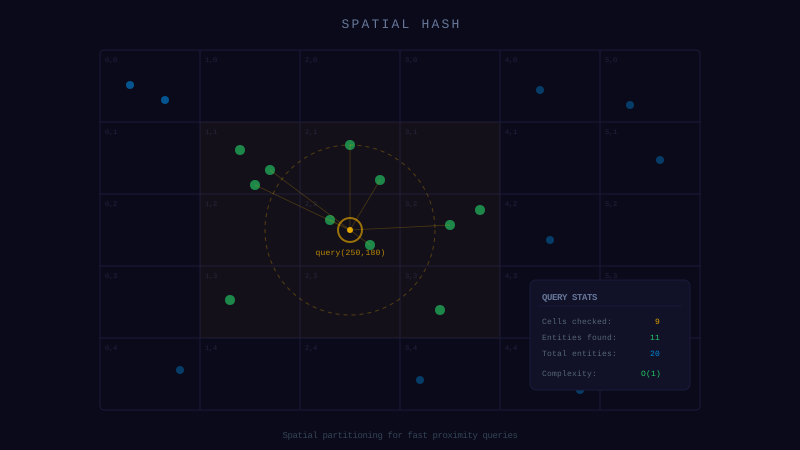
Description
The problem
Your AI wrote a loop that checks every entity against every other entity — O(n²). With 50 enemies it's fine. With 200 your FPS tanks. The AI doesn't think about spatial optimization because it's solving one problem at a time.
The solution
A spatial hash grid that divides the world into cells. Query a radius or rectangle and get only the entities in nearby cells — O(1) average.
- → rebuild(items, getX, getY) — reindex every frame
- → queryRadius(cx, cy, r) — find entities near a point
- → queryRect(x, y, w, h) — find entities in a rectangle
109 lines. Zero dependencies. Generic over any type.
Dependencies
None — zero external dependencies.
Technical Details
- Version
- 1.0.0
- Status
- Stable
- License
- MIT
- Size
- 2 KB
- Author
- Probably Playable
- Updated
- 2025-04-04
AI Integration Skill
Drop into .claude/skills/ — your AI handles the rest.
SpatialHash — Integration Skill
Use this skill when the user asks to "spatial hash", "proximity query",
"find nearby entities", "collision broadphase", "neighbor search", or "fast nearby lookup".
WHAT IT DOES
A generic spatial hash grid that partitions 2D space into fixed-size cells for fast proximity queries. Instead of checking every entity against every other entity (O(n^2)), items are bucketed by cell so queries only examine nearby candidates. This is the standard broadphase technique for games with many entities — towers finding enemies in range, bullets hitting targets, area-of-effect abilities, or any "find everything near this point" query.
REQUIREMENTS
- Framework: Any (Phaser, Three.js, vanilla JS, Node.js)
- Language: TypeScript or JavaScript
- Dependencies: None
- Files: 1 TypeScript file (~80 LOC)
INSTALL
- Copy the
SpatialHashclass into your project (e.g.,src/utils/SpatialHash.ts). - Import wherever needed:
- Create an instance with a cell size appropriate for your game:
- queryRadius returns an approximation. It returns all items in overlapping cells, which is a square region — not a true circle. Always do a final distance check on the results.
- Rebuild every frame. If entities move, the grid is stale. Call
rebuild()once at the start of your update loop, or after all positions are updated. Do not insert incrementally during the frame unless you know positions are final. - cellSize matters for performance. Too small and you check many cells. Too large and each cell has too many items. Match it to your typical query radius.
- Items at cell boundaries may appear in queries for adjacent cells. This is by design — better to return extras than miss items.
`typescript
import { SpatialHash } from './utils/SpatialHash';
`
`typescript
const hash = new SpatialHash<Enemy>(128);
`
INTEGRATION
Core Implementation
class SpatialHash<T> {
  private cellSize: number;
  private cells: Map<string, T[]> = new Map();

  constructor(cellSize: number) {
    this.cellSize = cellSize;
  }

  private key(x: number, y: number): string {
    const cx = Math.floor(x / this.cellSize);
    const cy = Math.floor(y / this.cellSize);
    return `${cx},${cy}`;
  }

  /** Insert a single item at a position */
  insert(item: T, x: number, y: number): void {
    const k = this.key(x, y);
    const bucket = this.cells.get(k);
    if (bucket) bucket.push(item);
    else this.cells.set(k, [item]);
  }

  /** Rebuild the entire grid from an array (call once per frame) */
  rebuild(items: T[], getX: (item: T) => number, getY: (item: T) => number): void {
    this.cells.clear();
    for (const item of items) {
      this.insert(item, getX(item), getY(item));
    }
  }

  /** Return all items in cells overlapping a circle — approximate, not exact */
  queryRadius(cx: number, cy: number, r: number): T[] {
    return this.queryRect(cx - r, cy - r, r * 2, r * 2);
  }

  /** Return all items in cells overlapping a rectangle */
  queryRect(x: number, y: number, w: number, h: number): T[] {
    const results: T[] = [];
    const minCx = Math.floor(x / this.cellSize);
    const minCy = Math.floor(y / this.cellSize);
    const maxCx = Math.floor((x + w) / this.cellSize);
    const maxCy = Math.floor((y + h) / this.cellSize);

    for (let cx = minCx; cx <= maxCx; cx++) {
      for (let cy = minCy; cy <= maxCy; cy++) {
        const bucket = this.cells.get(`${cx},${cy}`);
        if (bucket) results.push(...bucket);
      }
    }
    return results;
  }

  /** Remove all items */
  clear(): void {
    this.cells.clear();
  }
}
Tower Defense Example
const enemyHash = new SpatialHash<Enemy>(128);

// Every frame: rebuild with current positions
function update() {
  enemyHash.rebuild(enemies, e => e.x, e => e.y);

  // Each tower finds nearby enemies
  for (const tower of towers) {
    const candidates = enemyHash.queryRadius(tower.x, tower.y, tower.range);

    // Final distance check (spatial hash is approximate)
    const inRange = candidates.filter(e => {
      const dx = e.x - tower.x;
      const dy = e.y - tower.y;
      return dx * dx + dy * dy <= tower.range * tower.range;
    });

    if (inRange.length > 0) {
      tower.shoot(inRange[0]);
    }
  }
}
Area-of-Effect Example
function applyExplosion(x: number, y: number, radius: number, damage: number) {
  const candidates = enemyHash.queryRadius(x, y, radius);
  for (const enemy of candidates) {
    const dx = enemy.x - x;
    const dy = enemy.y - y;
    const dist = Math.sqrt(dx * dx + dy * dy);
    if (dist <= radius) {
      enemy.takeDamage(damage * (1 - dist / radius)); // Falloff
    }
  }
}
CONFIGURATION
| Option | Type | Default | Description |
|---|---|---|---|
cellSize | number | *required* | Size of each grid cell in pixels. Should be roughly equal to your largest query radius. |
Choosing cellSize: If most queries use a radius of 128px, set cellSize to 128. Too small = many cells checked per query. Too large = too many items per cell, losing the performance benefit.
API REFERENCE
| Method | Signature | Returns | Description |
|---|---|---|---|
constructor | new SpatialHash<T>(cellSize: number) | SpatialHash<T> | Create grid with given cell size |
insert | .insert(item: T, x: number, y: number) | void | Add one item at a position |
rebuild | .rebuild(items: T[], getX, getY) | void | Clear and re-insert all items (call each frame) |
queryRadius | .queryRadius(cx, cy, r) | T[] | All items in cells overlapping a circle |
queryRect | .queryRect(x, y, w, h) | T[] | All items in cells overlapping a rectangle |
clear | .clear() | void | Remove all items from all cells |
GOTCHAS
This codon is provided "as is" without warranty of any kind, express or implied. Probably Playable assumes no responsibility for any damages, data loss, security vulnerabilities, or defects arising from its use. You are solely responsible for reviewing, testing, and validating this code before integrating it into your project. Use at your own risk.