
Object Pool
StableStop creating and destroying objects every frame — reuse them
by Probably Playable — v1.0.0
Description
The problem
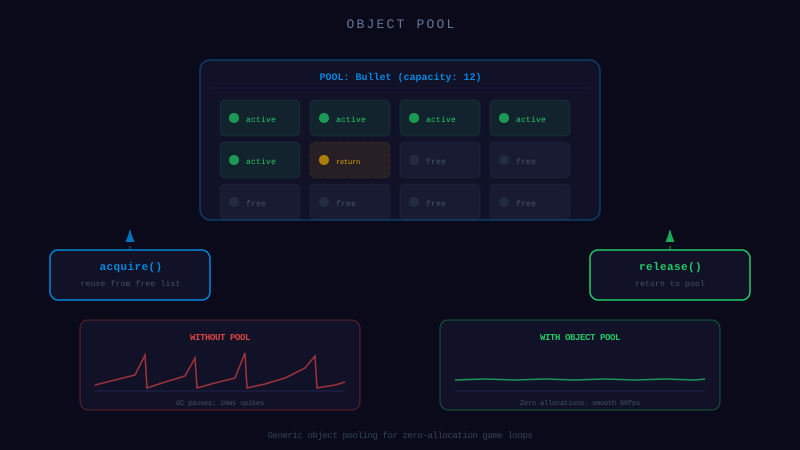
Your AI creates new Bullet() every time the player shoots and lets the garbage collector clean up. 200 bullets per second = GC stutters every few seconds. The AI doesn't think about memory because it solves one feature at a time.
The solution
A generic pool that recycles objects instead of creating new ones. Give it a factory function, and it handles the rest.
- → acquire() — get an object (reused or new)
- → release(obj) — return to pool
- → Prewarm — pre-create objects at init to avoid first-frame spikes
40 lines. Generic over any type. Zero dependencies.
Dependencies
None — zero external dependencies.
Technical Details
- Version
- 1.0.0
- Status
- Stable
- License
- MIT
- Size
- 1 KB
- Author
- Probably Playable
- Updated
- 2025-04-04
AI Integration Skill
Drop into .claude/skills/ — your AI handles the rest.
ObjectPool — Integration Skill
Use this skill when the user asks to "object pool", "reduce garbage collection",
"reuse objects", "particle pool", "bullet pool", or "avoid GC spikes".
WHAT IT DOES
A generic object pool that pre-allocates and recycles objects to eliminate garbage collection pressure. Instead of creating and destroying objects every frame (bullets, particles, enemies, damage numbers), you acquire them from the pool and release them back when done. The pool grows on demand if empty and supports optional pre-warming. This is essential for any game with frequently spawned/destroyed objects — GC pauses cause visible frame drops.
REQUIREMENTS
- Framework: Any (Phaser, Three.js, vanilla JS, Node.js)
- Language: TypeScript or JavaScript
- Dependencies: None
- Files: 1 TypeScript file (~40 LOC)
INSTALL
- Copy the
ObjectPoolclass into your project (e.g.,src/utils/ObjectPool.ts). - Import wherever needed:
- Create a pool with a factory function:
- You must reset objects before or after acquiring. The pool does not clean objects — it returns them in whatever state they were released. Always reset properties (position, velocity, health, visibility) when acquiring.
- Do not release an object twice. Releasing the same object twice means
acquire()will return it twice, causing two systems to share the same instance. Track active/inactive state yourself. - Hide objects before releasing. If the object has a visual representation (sprite, mesh), make it invisible or move it off-screen before releasing. The pool does not handle rendering.
- Pool only tracks inactive objects. The
sizeproperty shows how many are available in the pool, not how many are active in the game. Track active objects separately if needed. - Do not hold references to released objects. Once released, the object may be acquired by something else at any time. Remove it from all active lists before releasing.
`typescript
import { ObjectPool } from './utils/ObjectPool';
`
`typescript
const bulletPool = new ObjectPool(() => new Bullet(), 100);
`
INTEGRATION
Core Implementation
class ObjectPool<T> {
  private pool: T[] = [];
  private factory: () => T;

  /**
   * @param factory - Function that creates a new instance of T
   * @param prewarmCount - Number of objects to pre-allocate (optional)
   */
  constructor(factory: () => T, prewarmCount: number = 0) {
    this.factory = factory;
    for (let i = 0; i < prewarmCount; i++) {
      this.pool.push(factory());
    }
  }

  /** Get an object from the pool (creates one if pool is empty) */
  acquire(): T {
    return this.pool.length > 0 ? this.pool.pop()! : this.factory();
  }

  /** Return an object to the pool for reuse */
  release(obj: T): void {
    this.pool.push(obj);
  }

  /** Number of available (inactive) objects in the pool */
  get size(): number {
    return this.pool.length;
  }

  /** Clear the pool, optionally calling a destructor on each object */
  clear(destructor?: (obj: T) => void): void {
    if (destructor) {
      for (const obj of this.pool) {
        destructor(obj);
      }
    }
    this.pool.length = 0;
  }
}
Bullet Pool Example
class Bullet {
  x = 0;
  y = 0;
  vx = 0;
  vy = 0;
  active = false;

  reset(x: number, y: number, vx: number, vy: number): void {
    this.x = x;
    this.y = y;
    this.vx = vx;
    this.vy = vy;
    this.active = true;
  }
}

const bulletPool = new ObjectPool(() => new Bullet(), 200);
const activeBullets: Bullet[] = [];

function fireBullet(x: number, y: number, angle: number, speed: number) {
  const bullet = bulletPool.acquire();
  bullet.reset(x, y, Math.cos(angle) * speed, Math.sin(angle) * speed);
  activeBullets.push(bullet);
}

function updateBullets() {
  for (let i = activeBullets.length - 1; i >= 0; i--) {
    const b = activeBullets[i];
    b.x += b.vx;
    b.y += b.vy;

    if (b.x < 0 || b.x > WORLD_W || b.y < 0 || b.y > WORLD_H) {
      b.active = false;
      activeBullets.splice(i, 1);
      bulletPool.release(b);
    }
  }
}
Particle Pool Example
interface Particle {
  x: number;
  y: number;
  vx: number;
  vy: number;
  life: number;
  maxLife: number;
  color: string;
}

const particlePool = new ObjectPool<Particle>(() => ({
  x: 0, y: 0, vx: 0, vy: 0, life: 0, maxLife: 0, color: '#fff',
}), 500);

function spawnExplosion(x: number, y: number, count: number) {
  for (let i = 0; i < count; i++) {
    const p = particlePool.acquire();
    const angle = Math.random() * Math.PI * 2;
    const speed = 1 + Math.random() * 3;
    p.x = x;
    p.y = y;
    p.vx = Math.cos(angle) * speed;
    p.vy = Math.sin(angle) * speed;
    p.life = 30 + Math.random() * 30;
    p.maxLife = p.life;
    p.color = '#ff4400';
    activeParticles.push(p);
  }
}
CONFIGURATION
| Option | Type | Default | Description |
|---|---|---|---|
factory | () => T | *required* | Function that creates a new instance |
prewarmCount | number | 0 | Number of objects to pre-allocate at construction |
Choosing prewarmCount: Set it to your expected peak usage. For bullets, if you expect at most 200 on screen, prewarm 200. This avoids allocation spikes during gameplay. The pool grows beyond this if needed.
API REFERENCE
| Method | Signature | Returns | Description |
|---|---|---|---|
constructor | new ObjectPool<T>(factory, prewarmCount?) | ObjectPool<T> | Create pool with factory and optional pre-warming |
acquire | .acquire() | T | Get an object (from pool or newly created) |
release | .release(obj: T) | void | Return an object to the pool |
size | .size | number | Number of available objects in the pool (getter) |
clear | .clear(destructor?) | void | Empty the pool, optionally calling destructor on each |
GOTCHAS
This codon is provided "as is" without warranty of any kind, express or implied. Probably Playable assumes no responsibility for any damages, data loss, security vulnerabilities, or defects arising from its use. You are solely responsible for reviewing, testing, and validating this code before integrating it into your project. Use at your own risk.