
Line of Sight
StableCan this tower see that enemy? Tile-stepping raycast in 40 lines
by Probably Playable — v1.0.0
Description
The problem
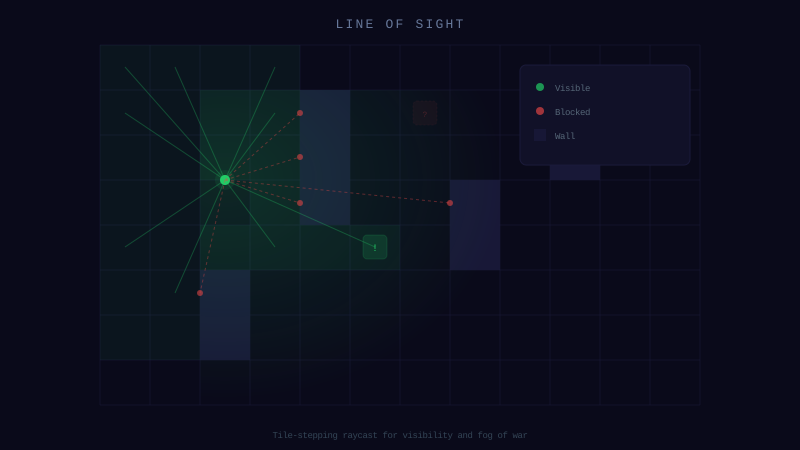
Your tower shoots through walls. Your AI calculated the distance to the enemy but forgot to check if there's a wall in between. Real visibility checks need raycasting, and your AI doesn't know how to do Bresenham on a tile grid.
The solution
One function: hasLineOfSight(ax, ay, bx, by, tileSize, isBlocking). Steps through tiles at half-tile increments. You provide the isBlocking callback — it works with any tile system.
40 lines. Zero dependencies. Pure function, no state.
Dependencies
None — zero external dependencies.
Technical Details
- Version
- 1.0.0
- Status
- Stable
- License
- MIT
- Size
- 1 KB
- Author
- Probably Playable
- Updated
- 2025-04-04
AI Integration Skill
Drop into .claude/skills/ — your AI handles the rest.
LineOfSight — Integration Skill
Use this skill when the user asks to "line of sight", "visibility check",
"raycast", "can see target", "wall blocking", or "check if blocked".
WHAT IT DOES
A tile-stepping raycast function that determines whether two points have an unobstructed line of sight on a tile-based grid. It walks from point A to point B in half-tile steps, checking each tile against a caller-provided blocking function. This is the go-to approach for tower targeting (can this tower see that enemy?), stealth mechanics (is the player visible to the guard?), and fog-of-war visibility checks.
REQUIREMENTS
- Framework: Any (Phaser, Three.js, vanilla JS, Node.js)
- Language: TypeScript or JavaScript
- Dependencies: None
- Files: 1 TypeScript file (~30 LOC)
INSTALL
- Copy the
hasLineOfSightfunction into your project (e.g.,src/utils/LineOfSight.ts). - Import wherever needed:
- Provide your own
isBlockingcallback that knows your map data. ax, ay— Start position in pixelsbx, by— End position in pixelstileSize— Tile size in pixelsisBlocking(col, row)— Returnstrueif tile at grid coordinates (col, row) blocks line of sight- Uses half-tile steps, not pixel-perfect. The ray samples at intervals of
tileSize / 2, so very thin walls (1px) between two steps could be missed. For tile-based games this is fine — tiles are the smallest blocking unit. - isBlocking receives grid coordinates, not pixels. The function converts pixel positions to tile
col/rowinternally. Your callback should work with grid indices. - Handle out-of-bounds in your callback. If the ray goes outside your map, your
isBlockingfunction should returntrue(blocked) orfalse(open) depending on your game rules. - Performance scales with distance. Long rays take more steps. If checking many pairs, combine with a range check first (distance < maxRange) to avoid unnecessary raycasts.
`typescript
import { hasLineOfSight } from './utils/LineOfSight';
`
INTEGRATION
Core Implementation
/**
 * Tile-stepping raycast: walks from (ax, ay) to (bx, by) in half-tile steps.
 * Returns true if the path is clear, false if any tile blocks it.
 *
 * @param ax - Start X in pixels
 * @param ay - Start Y in pixels
 * @param bx - End X in pixels
 * @param by - End Y in pixels
 * @param tileSize - Size of one tile in pixels
 * @param isBlocking - Callback: returns true if tile at (col, row) blocks sight
 */
function hasLineOfSight(
  ax: number, ay: number,
  bx: number, by: number,
  tileSize: number,
  isBlocking: (col: number, row: number) => boolean
): boolean {
  const dx = bx - ax;
  const dy = by - ay;
  const dist = Math.sqrt(dx * dx + dy * dy);
  const step = tileSize * 0.5; // Half-tile steps for accuracy
  const steps = Math.ceil(dist / step);

  for (let i = 0; i <= steps; i++) {
    const t = steps === 0 ? 0 : i / steps;
    const x = ax + dx * t;
    const y = ay + dy * t;
    const col = Math.floor(x / tileSize);
    const row = Math.floor(y / tileSize);

    if (isBlocking(col, row)) {
      return false;
    }
  }
  return true;
}
Tower Defense Example
// Your map data: 0 = open, 1 = wall
const tileMap: number[][] = [
  [0, 0, 0, 1, 0],
  [0, 1, 0, 1, 0],
  [0, 0, 0, 0, 0],
];

const TILE_SIZE = 64;

function isWall(col: number, row: number): boolean {
  if (row < 0 || row >= tileMap.length) return true;
  if (col < 0 || col >= tileMap[0].length) return true;
  return tileMap[row][col] === 1;
}

// Can the tower see the enemy?
const canShoot = hasLineOfSight(
  tower.x, tower.y,
  enemy.x, enemy.y,
  TILE_SIZE,
  isWall
);

if (canShoot) {
  tower.shoot(enemy);
}
Stealth Mechanics Example
function isPlayerVisible(guard: Guard, player: Player): boolean {
  // First check if within detection range
  const dx = player.x - guard.x;
  const dy = player.y - guard.y;
  if (dx * dx + dy * dy > guard.sightRange ** 2) return false;

  // Then check line of sight
  return hasLineOfSight(
    guard.x, guard.y,
    player.x, player.y,
    TILE_SIZE,
    isWall
  );
}
Fog of War Example
function updateVisibility(player: Player, visibleTiles: Set<string>) {
  const range = 8; // tiles
  const px = Math.floor(player.x / TILE_SIZE);
  const py = Math.floor(player.y / TILE_SIZE);

  for (let dy = -range; dy <= range; dy++) {
    for (let dx = -range; dx <= range; dx++) {
      if (dx * dx + dy * dy > range * range) continue;
      const tx = px + dx;
      const ty = py + dy;
      const targetX = (tx + 0.5) * TILE_SIZE;
      const targetY = (ty + 0.5) * TILE_SIZE;

      if (hasLineOfSight(player.x, player.y, targetX, targetY, TILE_SIZE, isWall)) {
        visibleTiles.add(`${tx},${ty}`);
      }
    }
  }
}
CONFIGURATION
| Option | Type | Default | Description |
|---|---|---|---|
tileSize | number | *required* | Pixel size of one tile. Must match your map grid. |
isBlocking | (col, row) => boolean | *required* | Callback returning true for tiles that block sight. |
The step size is fixed at tileSize * 0.5. For higher accuracy on very small tiles, you can reduce this multiplier to 0.25.
API REFERENCE
| Function | Signature | Returns | Description |
|---|---|---|---|
hasLineOfSight | hasLineOfSight(ax, ay, bx, by, tileSize, isBlocking) | boolean | true if no blocking tile between A and B |
Parameters:
GOTCHAS
This codon is provided "as is" without warranty of any kind, express or implied. Probably Playable assumes no responsibility for any damages, data loss, security vulnerabilities, or defects arising from its use. You are solely responsible for reviewing, testing, and validating this code before integrating it into your project. Use at your own risk.