
Event Bus
StableStop your AI from creating spaghetti code — clean system communication
by Probably Playable — v1.0.0
 1/2
1/2 Description
The problem
When you vibe-code a game with AI, each feature gets built in isolation. The AI creates a combat system, then a UI, then a sound manager — but it wires them together with direct imports and nested callbacks. Scene A imports Scene B imports Manager C. One change breaks three files. Ask the AI to add a new feature and it rewrites half your code. This is spaghetti, and it gets worse with every prompt.
The solution
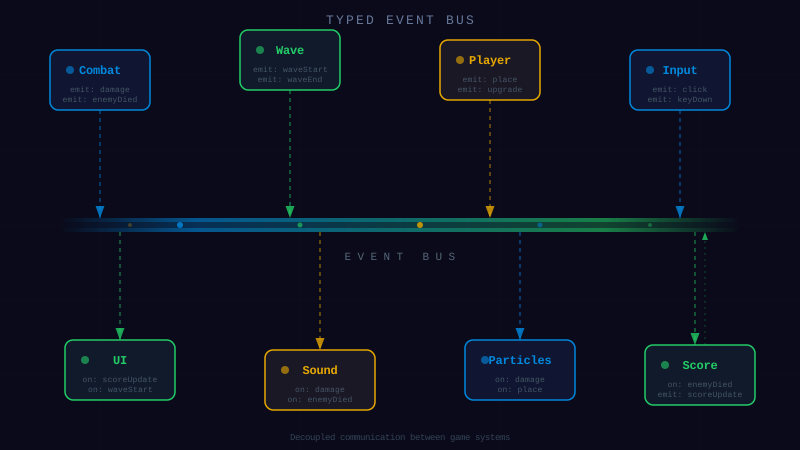
The Event Bus gives your AI a clean pattern to follow. Instead of importing modules into each other, systems talk through events:
// Sound — doesn't import Combat at all EventBus.on('ENEMY_KILLED', () => sound.play('explosion'));// UI — doesn’t import Combat either EventBus.on(‘ENEMY_KILLED’, (e) => updateScore(e.points));
// Combat — just announces what happened EventBus.emit(‘ENEMY_KILLED’, { id: enemy.id, points: 100 });
Three systems, zero imports between them. Adding a feature = adding a listener.
Why vibe-coders need this
- → Your AI won't create circular dependencies — events flow one way
- → Adding features means adding listeners, not editing existing code
- → The event constants file acts as a map of your game that both you and your AI can read
- → Built-in cleanup prevents the memory leaks your AI won't think about
API
Just 5 methods: on, off, once, emit, removeAll. Works with Phaser, Three.js, or plain JS. Zero dependencies.
Dependencies
None — zero external dependencies.
Technical Details
- Version
- 1.0.0
- Status
- Stable
- License
- MIT
- Size
- 5 KB
- Author
- Probably Playable
- Updated
- 2025-04-04
AI Integration Skill
Drop into .claude/skills/ — your AI handles the rest.
Event Bus — Integration Skill
Use this skill when the user asks to "add event system", "decouple components",
"pub/sub", "event bus", "event-driven architecture", or "inter-system communication".
WHAT IT DOES
A lightweight, typed publish/subscribe event system. Components emit and listen to
named events through a central bus, eliminating direct dependencies between game systems.
REQUIREMENTS
- Framework: Any (Phaser, Three.js, vanilla JS, Node.js)
- Language: TypeScript or JavaScript
- Dependencies: None
- Files: 2 TypeScript files (~120 LOC total)
FILE STRUCTURE
event-bus/
  EventBus.ts       — Singleton event emitter with emit/on/off/once/removeAll
  GameEvents.ts     — String constants for all event names (customize per project)
INSTALL
- Copy the
event-bus/folder into your project'ssrc/directory (e.g.,src/events/). - Import wherever needed:
- Always clean up listeners — When a scene, component, or manager is destroyed, call
EventBus.removeAll(this)or individuallyoff()each listener. Leaked listeners cause memory leaks and ghost behavior. - Event name typos — Always use the
GameEventsconstants object instead of raw strings. This gives you autocomplete and catches typos at compile time. - Listener order is not guaranteed — Don't rely on the order in which listeners fire. If you need ordering, use a priority queue pattern on top.
- Circular event chains — Be careful with A emitting B which emits A. Add guards or use
once()to prevent infinite loops. - Singleton scope — There's one global bus. In a multi-game setup (e.g., iframe embeds), each game needs its own EventBus instance. Create with
new EventEmitter()instead of the singleton. - Phaser compatibility — If already using Phaser, the EventBus can use
Phaser.Events.EventEmitteras its base class. For non-Phaser projects, a plain implementation is included.
import { EventBus } from './events/EventBus';
import { GameEvents } from './events/GameEvents';
INTEGRATION
Basic usage:
import { EventBus } from './events/EventBus';

// Subscribe to an event
EventBus.on('ENEMY_KILLED', (enemy: Enemy, killer: Tower) => {
  score += enemy.points;
  updateScoreUI(score);
});

// Emit an event from anywhere
EventBus.emit('ENEMY_KILLED', deadEnemy, tower);

// One-time listener
EventBus.once('GAME_OVER', () => showGameOverScreen());

// Unsubscribe
const handler = (wave: number) => console.log(`Wave ${wave}`);
EventBus.on('WAVE_START', handler);
EventBus.off('WAVE_START', handler);
Define typed event constants:
// GameEvents.ts — customize these for YOUR game
export const GameEvents = {
  // Combat
  ENEMY_SPAWNED: 'ENEMY_SPAWNED',
  ENEMY_KILLED: 'ENEMY_KILLED',
  PROJECTILE_FIRED: 'PROJECTILE_FIRED',

  // Progression
  WAVE_START: 'WAVE_START',
  WAVE_COMPLETE: 'WAVE_COMPLETE',
  LEVEL_UP: 'LEVEL_UP',

  // UI
  SCORE_UPDATED: 'SCORE_UPDATED',
  MENU_OPENED: 'MENU_OPENED',
  DIALOG_SHOWN: 'DIALOG_SHOWN',

  // System
  SAVE_GAME: 'SAVE_GAME',
  LOAD_GAME: 'LOAD_GAME',
  SETTINGS_CHANGED: 'SETTINGS_CHANGED',
} as const;

export type GameEvent = typeof GameEvents[keyof typeof GameEvents];
Scene cleanup (prevents memory leaks):
// In Phaser scene shutdown:
class BattleScene extends Phaser.Scene {
  create() {
    EventBus.on(GameEvents.ENEMY_KILLED, this.onEnemyKilled, this);
    EventBus.on(GameEvents.WAVE_COMPLETE, this.onWaveComplete, this);
  }

  shutdown() {
    // Remove all listeners bound to this scene
    EventBus.removeAll(this);
  }
}
With Three.js:
// In a Three.js game loop
class EnemyManager {
  constructor() {
    EventBus.on('FRAME_UPDATE', this.update.bind(this));
  }

  spawnEnemy(type: string, position: THREE.Vector3) {
    const enemy = new Enemy(type, position);
    this.enemies.push(enemy);
    EventBus.emit('ENEMY_SPAWNED', { type, position, id: enemy.id });
  }

  destroy() {
    EventBus.removeAll(this);
  }
}
API REFERENCE
EventBus (singleton)
| Method | Signature | Description |
|---|---|---|
emit | emit(event: string, ...args: any[]): void | Fire event to all registered listeners |
on | on(event: string, callback: Function, context?: any): void | Subscribe to event |
off | off(event: string, callback: Function, context?: any): void | Unsubscribe from event |
once | once(event: string, callback: Function, context?: any): void | Subscribe for one event only |
removeAll | removeAll(context?: any): void | Remove all listeners, optionally filtered by context |
CONFIGURATION
No configuration needed. The EventBus is a singleton — import and use.
To customize event names, edit GameEvents.ts with your game's domain events.
GOTCHAS
This codon is provided "as is" without warranty of any kind, express or implied. Probably Playable assumes no responsibility for any damages, data loss, security vulnerabilities, or defects arising from its use. You are solely responsible for reviewing, testing, and validating this code before integrating it into your project. Use at your own risk.