
Codon Extractor
StableAudit any game project and find extractable components for the store
by Probably Playable — v1.0.0
Description
What is this?
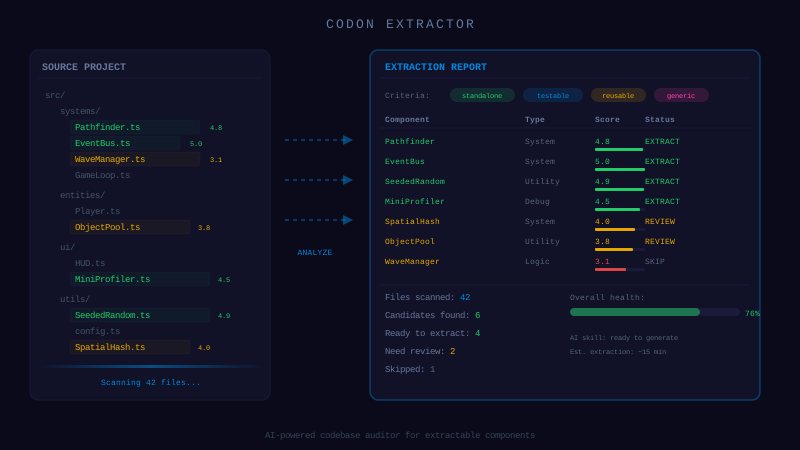
An AI skill that turns any game project into a source of codons. Point your AI assistant at your codebase, and it will scan, classify, and score every extractable component — editors, systems, gameplay mechanics, UI, economy, audio, devtools — then tell you exactly how to package each one.
Why vibe-coders need this
You've vibe-coded a game. It works. But buried in your codebase are components that other developers would kill for — a map editor you built in a weekend, an inventory system, a particle configurator. You just don't know which ones are extractable and how much work it would take.
This skill does the analysis for you. It scores each candidate on coupling, reusability, and completeness, then generates a step-by-step extraction plan.
What it covers
50+ component types across 10 categories:
- → Editors — Map, Animation, Cinematic, Particle, Sound, Balance, Behavior
- → Systems — Event Bus, State Machine, Save/Load, Asset Loader, i18n
- → Gameplay — Combat, Pathfinding, Wave Spawner, Crafting, Quests, Inventory
- → Character — Skill Tree, XP/Levels, Equipment, Evolution, Achievements
- → Economy — Currency, Shop, Rewards, Gacha, Trading
- → Input — Input Manager, Gestures, Virtual Joystick, Camera Controller
- → UI — HUD, Menus, Modals, Tooltips, Notifications, Leaderboard
- → Visual — Particles, Juice/Feedback, Fog of War, Lighting, Shaders
- → Audio — Music Manager, SFX Manager, Visualizer
- → DevTools — Debug Console, God Mode, Performance Monitor, Replay
How to use
- Copy the skill into your project’s
.claude/skills/directory - Ask your AI: “Audit this project for extractable codons”
- Get a structured report with scores, effort estimates, and extraction steps
- Package the best candidates using the included templates
Dependencies
None — zero external dependencies.
Technical Details
- Version
- 1.0.0
- Status
- Stable
- License
- MIT
- Size
- 12 KB
- Author
- Probably Playable
- Updated
- 2025-04-04
AI Integration Skill
Drop into .claude/skills/ — your AI handles the rest.
Codon Extractor — Project Audit Skill
Use this skill when the user asks to "find extractable components", "audit my project for codons",
"what can I contribute to the codon store", "extract codons from my game", or "list reusable components".
WHAT IT DOES
Analyzes a game project to identify components that can be extracted as standalone codons
for The Codon Store (probably-playable.com/codons). Produces a ranked list of candidates
with extraction feasibility, required artifacts, and effort estimates.
AUDIT PROCESS
Step 1 — Scan the project
Read the project structure, identify frameworks used (Phaser, Three.js, vanilla, etc.),
and map out the major systems. Look for:
- Scene files / main game loops
- Manager/system classes (singletons, services)
- UI components (menus, HUD, dialogs)
- Editor/tool scenes
- Utility modules
- Config/data files
Step 2 — Classify each candidate
For each potential codon, determine its category from the taxonomy below,
then assess its coupling level (how tangled it is with the rest of the project).
Step 3 — Score extraction feasibility
Rate each candidate on 3 axes (1-5):
| Axis | 1 (Hard) | 5 (Easy) |
|---|---|---|
| Coupling | Imports 10+ project-specific modules | Self-contained, 0-2 external deps |
| Reusability | Only works for this exact game | Useful in any game of this genre |
| Completeness | Needs the whole project to function | Works standalone with minimal setup |
Extraction score = average of the 3 axes. Prioritize candidates scoring 3.5+.
Step 4 — Generate the codon list
Output a table with: name, category, score, effort estimate, and key dependencies to decouple.
---|-------------|---------|
| Map Editor | Tile-based or grid-based level designer | Tilemap painter, terrain editor, room builder |
|---|---|---|
| Cinematic Editor | Cutscene/dialog sequence builder | Timeline, camera moves, dialog bubbles, triggers |
| Particle Editor | Visual particle system tuner | Emitter config, preview, presets, export |
| Sound Editor | Audio mixer, SFX sequencer | Volume curves, spatial audio config, playlist |
| Balance Tuner | Live-tweaking panel for game values | Sliders for damage, speed, spawn rates |
| Level Flow Editor | Campaign/progression tree designer | Node graph, unlock conditions, branching paths |
| Behavior Editor | AI rule builder (condition → action) | Drag-drop rules, priority system, test mode |
| Sprite Packer | Atlas/spritesheet generator | Frame arrangement, padding, JSON export |
Core Systems
Architectural patterns that structure the game. Essential for clean vibe-coded projects.
| Type | Description | Examples |
|---|---|---|
| Event Bus | Pub/sub decoupled messaging | emit/on/off, typed events, wildcard, cleanup |
| State Machine | Finite state management | States, transitions, guards, history |
| Scene Manager | Scene lifecycle orchestrator | Transitions, overlays, preloading, stacking |
| Save/Load System | Game state persistence | localStorage, cloud sync, migration, versioning |
| Config Manager | Centralized game settings | Defaults, overrides, hot-reload, validation |
| Asset Loader | Smart resource loading pipeline | Manifest, progress, retry, cache, lazy load |
| Localization (i18n) | Multi-language text system | Key-based strings, plurals, RTL, fallbacks |
Gameplay Mechanics
Game-specific systems that implement core loops. Extractable when parameterized.
| Type | Description | Examples |
|---|---|---|
| Wave Spawner | Enemy wave composition & timing | Wave curves, spawn points, difficulty scaling |
| Combat System | Damage, health, hit detection | DPS calc, armor, crits, status effects, hitboxes |
| Pathfinding | Navigation mesh or grid-based A* | Waypoints, obstacles, dynamic recalc, flow fields |
| Physics Engine | Custom physics (not framework built-in) | Mass, forces, collision response, ragdoll |
| Crafting System | Recipe-based item creation | Ingredients, recipes, discovery, upgrade tiers |
| Quest/Mission System | Objective tracking | Objectives, prerequisites, rewards, branching |
| Dialogue System | Branching conversation engine | Nodes, choices, conditions, variables, portraits |
| Inventory System | Item management | Slots, stacking, drag-drop, sorting, filters |
| Loot Table | Probabilistic item drops | Rarity tiers, weighted random, pity system |
Character & Progression
Systems that manage player/entity growth over time.
| Type | Description | Examples |
|---|---|---|
| Skill Tree | Branching ability unlocks | Nodes, prerequisites, points, reset, visual tree |
| Experience/Level System | XP curves and leveling | XP formula, level caps, prestige, milestones |
| Equipment System | Gear slots and stat bonuses | Slot types, set bonuses, compare, enchant |
| Evolution/Upgrade System | Entity tier progression | Tiers, materials, visual changes, stat growth |
| Achievement System | Trackable goals and rewards | Conditions, progress bars, unlock rewards, badges |
| Talent/Perk System | Passive modifiers | Perk slots, stacking rules, synergies |
Economy
In-game resource and transaction management.
| Type | Description | Examples |
|---|---|---|
| Currency Manager | Multi-currency wallet | Earn, spend, convert, display, overflow protection |
| Shop System | Buy/sell interface + pricing | Catalog, pricing, discounts, purchase validation |
| Reward System | Structured reward distribution | Daily rewards, streaks, first-time bonuses |
| Gacha/Pull System | Randomized reward draws | Pity counters, banners, guaranteed thresholds |
| Auction/Trading | Player-to-player exchange | Listings, bids, escrow, history |
Input & Controls
Player input handling and control schemes.
| Type | Description | Examples |
|---|---|---|
| Input Manager | Unified input abstraction | Keyboard, gamepad, touch, rebinding, dead zones |
| Gesture Recognizer | Touch gesture detection | Swipe, pinch, long-press, multi-touch |
| Virtual Joystick | On-screen touch controls | Joystick, d-pad, action buttons, auto-hide |
| Drag & Drop System | Pointer-based object manipulation | Drag start/move/end, snap-to-grid, drop zones |
| Camera Controller | Camera movement and effects | Pan, zoom, follow, shake, boundaries, smoothing |
UI Components
Reusable interface elements.
| Type | Description | Examples |
|---|---|---|
| HUD System | Heads-up display framework | Health bars, minimap, resource counters, cooldowns |
| Menu System | Navigable menu screens | Main menu, pause, settings, transitions |
| Dialog/Modal | Popup windows | Confirm, alert, custom content, backdrop |
| Tooltip System | Context-sensitive info popups | Hover triggers, positioning, rich content |
| Notification System | Toast/alert messages | Queue, duration, priority, dismiss, animation |
| Leaderboard UI | Score ranking display | Local/global, pagination, player highlight |
Visual & Effects
Graphics systems beyond basic rendering.
| Type | Description | Examples |
|---|---|---|
| Particle System | Configurable particle emitters | Explosion, trail, rain, fire, custom shapes |
| Juice/Feedback System | Game feel effects | Screen shake, flash, slow-mo, hit-stop, squash |
| Fog of War | Visibility management | Tile-based, ray-cast, explored/visible states |
| Lighting System | Dynamic 2D/3D lighting | Point lights, shadows, day/night cycle |
| Shader Collection | Reusable shader effects | CRT, outline, dissolve, water, glow |
| Tween/Animation Library | Programmatic animations | Easing functions, chains, parallel, stagger |
Audio
Sound management beyond basic playback.
| Type | Description | Examples |
|---|---|---|
| Music Manager | Background music system | Crossfade, layers, adaptive, loop points |
| SFX Manager | Sound effect system | Pooling, spatial, priority, pitch variation |
| Audio Visualizer | Reactive visuals from audio | FFT, beat detection, waveform display |
DevTools
Development-time utilities.
| Type | Description | Examples |
|---|---|---|
| Debug Console | In-game command line | Commands, autocomplete, history, output log |
| God Mode Panel | Live value tweaker | Sliders, toggles, presets, persist to JSON |
| Performance Monitor | FPS and memory tracker | Graphs, entity counts, draw calls, warnings |
| Replay System | Input recording and playback | Record, replay, seek, export, regression test |
---
EXTRACTION REQUIREMENTS
For a component to become a codon, it must meet these criteria:
Must have
- Self-contained — works without importing game-specific modules (or those deps are parameterized)
- Documented entry point — clear constructor/init with typed config options
- Clean teardown — destroy/cleanup method that frees all resources
- No hardcoded assets — assets are passed in or configurable, not baked into the code
- TypeScript with strict types
- Event-based communication (not direct method calls to parent systems)
- localStorage or pluggable persistence
- Keyboard shortcuts documented
- Works at different resolutions
- Verify it builds standalone (no imports to the original project)
- Test the skill.md by asking an AI to integrate it into a fresh project
- Submit to The Codon Store at https://probably-playable.com/codons
Nice to have
---
REQUIRED ARTIFACTS
Each codon must be packaged with these files:
my-codon/
  src/                    ← Source code (TypeScript)
    MainClass.ts          ← Primary entry point
    Types.ts              ← Interfaces and type definitions
    ...                   ← Supporting modules
  skill.md                ← AI integration skill (REQUIRED)
  README.md               ← Human-readable documentation
skill.md format
The skill file MUST follow this structure:
# [Codon Name] — Integration Skill

Use this skill when the user asks to "[trigger phrases]".

## WHAT IT DOES
[One paragraph description]

## REQUIREMENTS
- Framework: [Phaser 3.60+ / Three.js / vanilla / etc.]
- Dependencies: [list or "none"]

## INSTALL
[Numbered steps to add the codon to a project]

## INTEGRATION
[TypeScript code examples showing how to use it]

## CONFIGURATION
[Table of options with types and defaults]

## API REFERENCE
[Public methods with signatures]

## EVENTS
[Events emitted, if any]

## GOTCHAS
[Common mistakes the AI should avoid]
README.md format
# [Codon Name]

[One-line description]

## Quick Start
[3-step setup]

## AI Integration
Copy `skill.md` into `.claude/skills/` — your AI handles the rest.

## Features
[Bullet list]

## Requirements
[Framework + version]

## License
MIT - [Author]
---
OUTPUT FORMAT
After auditing, produce this report:
# Codon Audit Report — [Project Name]

## Summary
- Framework: [detected]
- Total candidates found: [N]
- High priority (score 4+): [N]
- Medium priority (score 3-4): [N]

## Candidates

| # | Name | Category | Score | Effort | Key Decoupling Needed |
|---|------|----------|-------|--------|----------------------|
| 1 | ... | Editor | 4.7 | Small | Remove hardcoded tileset |
| 2 | ... | System | 4.0 | Medium | Abstract save backend |

## Detailed Analysis

### 1. [Component Name]
- **Category:** [from taxonomy]
- **Score:** [N/5] (Coupling: N, Reusability: N, Completeness: N)
- **Files:** [list of source files]
- **Current dependencies:** [what it imports from the game]
- **Extraction steps:**
  1. [specific step]
  2. [specific step]
- **Effort:** [Small / Medium / Large]
---
SUBMISSION
Once a codon is extracted and packaged:
Manifest endpoint: https://probably-playable.com/codons/manifest.json
This codon is provided "as is" without warranty of any kind, express or implied. Probably Playable assumes no responsibility for any damages, data loss, security vulnerabilities, or defects arising from its use. You are solely responsible for reviewing, testing, and validating this code before integrating it into your project. Use at your own risk.