
Cinematic System
BetaCutscenes, dialogues, tutorials — a framework your AI knows how to use
by Probably Playable — v1.0.0
Description
The problem
You need cutscenes, tutorials, or dialogue sequences — but building a cinematic system from scratch is weeks of work. Your AI builds one-off solutions that don't compose: each dialogue box, camera pan, or spotlight is custom code that can't be reused, sequenced, or edited visually. You end up with fragile, hardcoded scene scripts that break every time you change the flow.
The solution
A pluggable framework where sequences are JSON, step types are registered, and everything is editable in a visual timeline. The included skill.md teaches your AI the entire system — it can define sequences, register custom steps, and wire up the editor without guessing.
- -> Define once, play anywhere — sequences are pure JSON, no hardcoded logic
- -> Extend with custom steps — register your own step types with executors + editor fields
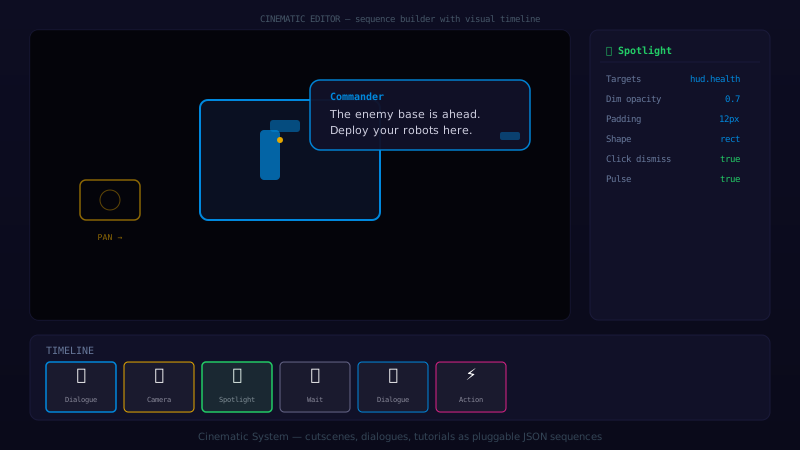
- -> Visual editor built in — drag-and-drop timeline, step property panel, live preview
- -> Skip & abort — players can skip cutscenes, sequences clean up properly
What's included
3 layers, 17 files:
- Core —
SequencePlayerruntime +StepRegistry+ConditionRegistry+DefaultTargetResolver. Plays sequences step-by-step, emits events, supports skip/abort/speed control. - Built-in steps — Dialogue (text + speaker + portrait), Camera (pan/zoom/shake/follow), Wait (duration or condition), Spotlight (dim + circle highlight), Action (fire events). Ready to use out of the box.
- Editor — Visual
CinematicEditorScenewith drag-and-drop timeline, per-step property panel, undo/redo, and live preview. Author sequences in-game without touching JSON.
How it works
| Layer | Purpose | Key files |
|---|---|---|
| Core | Plays sequences, resolves targets, emits events | SequencePlayer, StepRegistry, ConditionRegistry |
| Steps | Built-in step types with executors and renderers | DialogueStep, CameraStep, WaitStep, SpotlightStep, ActionStep |
| Editor | Visual authoring with timeline and property panel | CinematicEditorScene, TimelinePanel, StepEditorPanel |
Quick example
// Define a tutorial sequence as JSON
const tutorial: CinematicSequence = {
  id: 'first_tutorial',
  steps: [
    { type: 'spotlight', target: 'move_button', radius: 60, duration: 3000,
      text: 'Use this button to move your units.' },
    { type: 'camera', target: 'enemy_base', action: 'pan', duration: 2000 },
    { type: 'dialogue', speaker: 'AI', text: 'That is the enemy base. Destroy it.' },
  ],
};

// Play it
const player = new SequencePlayer({ scene, eventBus, stepRegistry, targetResolver });
await player.play(tutorial);
Dependencies
- Phaser 3.60+
Technical Details
- Version
- 1.0.0
- Status
- Beta
- License
- MIT
- Size
- 45 KB
- Author
- Probably Playable
- Updated
- 2025-04-04
AI Integration Skill
Drop into .claude/skills/ — your AI handles the rest.
Cinematic System — Integration Skill
Use this skill when the user asks to "add cinematic system", "cutscene editor",
"dialogue system", "camera sequence", "tutorial builder", or "cinematic director".
WHAT IT DOES
A pluggable framework for cinematic sequences in Phaser 3 games: cutscenes, tutorials,
dialogues, camera pans, spotlights, and timed actions. Ships with a SequencePlayer
runtime that executes JSON-defined sequences step-by-step, plus a visual
CinematicEditorScene for authoring and previewing sequences in-game.
Step types are registered at boot and fully extensible — add your own dialogue boxes,
camera behaviors, or game-specific actions without touching the core.
REQUIREMENTS
- Framework: Phaser 3.60+
- Language: TypeScript (strict mode)
- Dependencies: None beyond Phaser (self-contained)
- Files: 17 TypeScript files (~3,800 LOC total)
FILE STRUCTURE
cinematics/
  core/
    SequencePlayer.ts          — Main runtime: plays sequences step-by-step
    StepRegistry.ts            — Registry for step type executors
    ConditionRegistry.ts       — Registry for conditional branching predicates
    DefaultTargetResolver.ts   — Resolves named targets (sprites, cameras, points)
    CinematicSequence.ts       — Type definitions for sequences and steps
    CinematicEvents.ts         — Event name constants
    types.ts                   — Shared interfaces (IEventBus, IStepExecutor, etc.)
  steps/
    DialogueStep.ts            — Show dialogue box with text, speaker, portrait
    CameraStep.ts              — Pan, zoom, shake, follow camera movements
    WaitStep.ts                — Delay for duration or until condition
    SpotlightStep.ts           — Dim screen and spotlight a target
    ActionStep.ts              — Fire arbitrary event or call registered action
    registerBuiltinSteps.ts    — Convenience: registers all built-in step types
  renderers/
    DialogueRenderer.ts        — Default dialogue box rendering (DOM or Canvas)
    SpotlightRenderer.ts       — Overlay + mask rendering for spotlights
  editor/
    CinematicEditorScene.ts    — Visual timeline editor scene
    StepEditorPanel.ts         — Per-step property editor with field types
    TimelinePanel.ts           — Drag-and-drop timeline of sequence steps
INSTALL
- Copy the
cinematics/folder into your project'ssrc/cinematics/directory. - Register
CinematicEditorScenein your Phaser game config: - Register built-in step types at boot:
- Register types BEFORE loading sequences — If a sequence references a step type that isn't registered yet,
SequencePlayer.play()will throw. CallregisterBuiltinSteps(registry)and register all custom types at boot, before any sequence is loaded or played. - TargetResolver providers are called at pan-time, not registration — When you call
resolver.register('player', () => this.player), the arrow function is stored and invoked lazily when a step actually needs the target. This means the target can move or change between registration and use. Don't cache stale references. - Editor needs parentSceneKey, not a hardcoded scene — The
CinematicEditorSceneneeds to know which scene it overlays. Always passparentSceneKeyin the launch data. If omitted, the editor can't preview steps in context. - Sequences are pure JSON — no functions in step data — Step definitions must be serializable. Put logic in executors, not in step objects. The editor saves/loads sequences as JSON.
- Call player.abort() in scene shutdown — If the scene shuts down while a sequence is playing, orphaned promises and tweens will cause errors. Always abort in your scene's
shutdownevent: - customTranslations checked before external i18n — For the Dialogue step, the
customTranslationsmap on the step itself takes priority over any external i18n system you've configured. This lets individual sequences override global translations.
import { CinematicEditorScene } from './cinematics/editor/CinematicEditorScene';

const config: Phaser.Types.Core.GameConfig = {
  // ... your existing config
  scene: [
    // ... your existing scenes
    CinematicEditorScene,
  ],
};
import { StepRegistry } from './cinematics/core/StepRegistry';
import { registerBuiltinSteps } from './cinematics/steps/registerBuiltinSteps';

const registry = new StepRegistry();
registerBuiltinSteps(registry);
INTEGRATION
1. Define a sequence as JSON
import type { CinematicSequence } from './cinematics/core/CinematicSequence';

const introSequence: CinematicSequence = {
  id: 'intro_cutscene',
  steps: [
    {
      type: 'camera',
      target: 'player',
      action: 'pan',
      duration: 1500,
      ease: 'Sine.easeInOut',
    },
    {
      type: 'dialogue',
      speaker: 'Commander',
      text: 'Welcome to the facility. Stay alert.',
      portrait: 'commander_portrait',
      duration: 3000,
    },
    {
      type: 'spotlight',
      target: 'control_panel',
      radius: 80,
      duration: 2000,
      text: 'Click the control panel to begin.',
    },
  ],
};
2. Play a sequence at runtime
import { SequencePlayer } from './cinematics/core/SequencePlayer';
import { DefaultTargetResolver } from './cinematics/core/DefaultTargetResolver';

const resolver = new DefaultTargetResolver(this); // 'this' = current scene
resolver.register('player', () => this.player);
resolver.register('control_panel', () => this.controlPanel);

const player = new SequencePlayer({
  scene: this,
  eventBus: this.eventBus,       // your IEventBus implementation
  stepRegistry: registry,
  targetResolver: resolver,
});

await player.play(introSequence);
// Resolves when sequence completes or is skipped
3. Register a custom step type
import type { IStepExecutor } from './cinematics/core/types';

interface ShakeStep {
  type: 'shake';
  intensity: number;
  duration: number;
}

const shakeExecutor: IStepExecutor<ShakeStep> = {
  execute: async (step, context) => {
    context.scene.cameras.main.shake(step.duration, step.intensity / 1000);
    await new Promise(resolve => setTimeout(resolve, step.duration));
  },
  skip: (step, context) => {
    context.scene.cameras.main.resetFX();
  },
};

registry.register('shake', shakeExecutor);
4. Launch the visual editor
// From any scene:
this.scene.launch('CinematicEditorScene', {
  parentSceneKey: this.scene.key,
  sequence: introSequence,         // optional: load existing sequence
  stepRegistry: registry,
  targetResolver: resolver,
  onSave: (updatedSequence: CinematicSequence) => {
    console.log('Saved:', JSON.stringify(updatedSequence));
  },
});
CONFIGURATION
All dependencies are injected — no globals, no singletons.
| Dependency | Type | Required | Description |
|---|---|---|---|
| scene | Phaser.Scene | Yes | The active scene for rendering and camera access |
| eventBus | IEventBus | Yes | Emits cinematic events (can be your game's EventBus codon) |
| stepRegistry | StepRegistry | Yes | Holds all registered step type executors |
| targetResolver | DefaultTargetResolver | Yes | Resolves string names to game objects/positions |
| conditionRegistry | ConditionRegistry | No | For conditional branching in Wait steps |
IEventBus interface
interface IEventBus {
  emit(event: string, ...args: any[]): void;
  on(event: string, callback: (...args: any[]) => void): void;
  off(event: string, callback: (...args: any[]) => void): void;
}
API REFERENCE
SequencePlayer
| Method | Signature | Description |
|---|---|---|
| play | play(sequence: CinematicSequence): Promise<void> | Play a full sequence, resolves on completion |
| skip | skip(): void | Skip the current step (advances to next) |
| abort | abort(): void | Abort the entire sequence immediately |
| setSpeed | setSpeed(multiplier: number): void | Adjust playback speed (1.0 = normal) |
| isPlaying | isPlaying(): boolean | Whether a sequence is currently active |
| getCurrentStep | getCurrentStep(): number | Index of the currently executing step |
StepRegistry
| Method | Signature | Description |
|---|---|---|
| register | register<T>(type: string, executor: IStepExecutor<T>): void | Register a step type |
| getExecutor | getExecutor(type: string): IStepExecutor<any> | Get executor for a step type |
| hasType | hasType(type: string): boolean | Check if a step type is registered |
| getTypes | getTypes(): string[] | List all registered type names |
ConditionRegistry
| Method | Signature | Description |
|---|---|---|
| register | register(name: string, predicate: () => boolean): void | Register a named condition |
| evaluate | evaluate(name: string): boolean | Evaluate a condition by name |
DefaultTargetResolver
| Method | Signature | Description |
|---|---|---|
| register | register(name: string, provider: () => any): void | Register a named target provider |
| resolve | resolve(name: string): any | Resolve a target name to its current value |
CinematicEditorScene
| Method | Signature | Description |
|---|---|---|
| create | create(data: EditorConfig): void | Initialize editor with config |
| getSequence | getSequence(): CinematicSequence | Get the current sequence being edited |
registerBuiltinSteps
function registerBuiltinSteps(registry: StepRegistry): void
Registers all built-in step types: dialogue, camera, wait, spotlight, action.
EVENTS
All event names are constants on CinematicEvents:
import { CinematicEvents } from './cinematics/core/CinematicEvents';

// Runtime events
CinematicEvents.SEQUENCE_START    // (sequenceId: string)
CinematicEvents.SEQUENCE_COMPLETE // (sequenceId: string)
CinematicEvents.STEP_START        // (stepIndex: number, stepType: string)
CinematicEvents.STEP_COMPLETE     // (stepIndex: number, stepType: string)
CinematicEvents.STEP_SKIP         // (stepIndex: number, stepType: string)
CinematicEvents.STATE_CHANGE      // (state: 'playing' | 'paused' | 'idle')

// Editor events
CinematicEvents.EDITOR_OPEN       // (sequenceId: string | null)
CinematicEvents.EDITOR_CLOSE      // ()
CinematicEvents.EDITOR_SAVE       // (sequence: CinematicSequence)
Usage:
eventBus.on(CinematicEvents.STEP_START, (index, type) => {
  console.log(`Step ${index} (${type}) started`);
});

eventBus.on(CinematicEvents.SEQUENCE_COMPLETE, (id) => {
  // Re-enable player input after cutscene
  this.player.setActive(true);
});
CREATING CUSTOM STEP TYPES
A custom step type has up to 3 parts:
1. StepExecutor (required)
Defines how the step runs and how it can be skipped:
import type { IStepExecutor, StepContext } from './cinematics/core/types';

interface FadeStep {
  type: 'fade';
  direction: 'in' | 'out';
  color: number;
  duration: number;
}

const fadeExecutor: IStepExecutor<FadeStep> = {
  execute: async (step: FadeStep, ctx: StepContext) => {
    const cam = ctx.scene.cameras.main;
    if (step.direction === 'out') {
      cam.fadeOut(step.duration, (step.color >> 16) & 0xff, (step.color >> 8) & 0xff, step.color & 0xff);
    } else {
      cam.fadeIn(step.duration, (step.color >> 16) & 0xff, (step.color >> 8) & 0xff, step.color & 0xff);
    }
    await new Promise(resolve => cam.once('camerafadeincomplete', resolve));
  },
  skip: (step: FadeStep, ctx: StepContext) => {
    ctx.scene.cameras.main.resetFX();
  },
};
2. StepRenderer (optional)
For visual step types, a renderer handles the display:
import type { IStepRenderer } from './cinematics/core/types';

const fadeRenderer: IStepRenderer<FadeStep> = {
  create: (step, ctx) => {
    // Create any persistent display objects
  },
  destroy: (ctx) => {
    // Clean up display objects
  },
};
3. StepEditorDef (optional, for the visual editor)
Defines the fields shown in the editor panel:
import type { StepEditorDef } from './cinematics/editor/StepEditorPanel';

const fadeEditorDef: StepEditorDef = {
  type: 'fade',
  label: 'Fade',
  icon: 'fade-icon',
  fields: [
    { key: 'direction', label: 'Direction', type: 'select', options: ['in', 'out'] },
    { key: 'color', label: 'Color', type: 'color', default: 0x000000 },
    { key: 'duration', label: 'Duration (ms)', type: 'number', min: 100, max: 5000, default: 1000 },
  ],
  defaults: {
    type: 'fade',
    direction: 'out',
    color: 0x000000,
    duration: 1000,
  },
};
4. Register everything
registry.register('fade', fadeExecutor, fadeRenderer, fadeEditorDef);
BUILT-IN STEP TYPES
| Type | Key Fields | Description |
|---|---|---|
dialogue | speaker, text, portrait, duration, position | Show dialogue box with optional portrait |
camera | target, action (pan/zoom/shake/follow), duration, ease | Camera movement |
wait | duration, condition | Pause for time or until condition is true |
spotlight | target, radius, duration, text | Dim screen + circle highlight on target |
action | event, payload | Emit a custom event on the eventBus |
CUSTOM TRANSLATIONS
The Dialogue step supports translation overrides:
const step = {
  type: 'dialogue',
  speaker: 'Commander',
  text: 'Default English text',
  customTranslations: {
    fr: { speaker: 'Commandant', text: 'Texte en francais' },
    ja: { speaker: 'CMDR', text: 'JP text' },
  },
};
customTranslations is checked first. If the current locale is not found there,
the system falls back to an external i18n provider (if configured), then to the
default text field.
GOTCHAS
this.events.on('shutdown', () => {
  player.abort();
});
This codon is provided "as is" without warranty of any kind, express or implied. Probably Playable assumes no responsibility for any damages, data loss, security vulnerabilities, or defects arising from its use. You are solely responsible for reviewing, testing, and validating this code before integrating it into your project. Use at your own risk.